# EC2: Virtual Machines
- [EC2: Virtual Machines](#ec2-virtual-machines)
- [What is Amazon EC2?](#what-is-amazon-ec2)
- [EC2 Sizing \& Configuration Options](#ec2-sizing--configuration-options)
- [EC2 User Data](#ec2-user-data)
- [EC2 Instance Types - Overview](#ec2-instance-types---overview)
- [General Purpose Instances](#general-purpose-instances)
- [Compute Optimized Instances](#compute-optimized-instances)
- [Memory Optimized Instances](#memory-optimized-instances)
- [Storage Optimized Instances](#storage-optimized-instances)
- [EC2 Instance Types: Example](#ec2-instance-types-example)
- [Introduction to Security Groups](#introduction-to-security-groups)
- [Common Use Cases](#common-use-cases)
- [Deeper Dive](#deeper-dive)
- [Security Groups Diagram](#security-groups-diagram)
- [Examples of Security Group Rules](#examples-of-security-group-rules)
- [Good to Know](#good-to-know)
- [Classic Ports to Know](#classic-ports-to-know)
- [EC2 Instance Launch Types](#ec2-instance-launch-types)
- [On Demand Instance](#on-demand-instance)
- [Reserved Instances](#reserved-instances)
- [Savings Plans](#savings-plans)
- [Spot Instances](#spot-instances)
- [Dedicated Hosts](#dedicated-hosts)
- [Dedicated Instances](#dedicated-instances)
- [Capacity Reservations](#capacity-reservations)
- [EC2 Instance Launch Types Comparison](#ec2-instance-launch-types-comparison)
- [Which purchasing option is right for my use case?](#which-purchasing-option-is-right-for-my-use-case)
- [Price Comparison Example – m4.large – us-east-1](#price-comparison-example--m4large--us-east-1)
- [Shared Responsibility Model for EC2](#shared-responsibility-model-for-ec2)
- [EC2 Section – Summary](#ec2-section--summary)
## What is Amazon EC2?
- **Amazon Elastic Compute Cloud (EC2)** is a scalable compute service that allows users to rent virtual servers in the cloud.
- It provides flexibility to scale compute resources up or down based on demand, offering a cost-effective solution for applications with variable workloads.
- Key features include:
- **On-Demand Instances**: Pay for compute capacity by the hour or second, with no long-term commitments.
- **Reserved Instances**: Make a one-time payment for a significant discount on instance usage over a one- or three-year term.
- **Spot Instances**: Bid for unused EC2 capacity at a potentially lower price, allowing cost savings for flexible workloads.
### EC2 Sizing & Configuration Options
- EC2 allows for customized sizing and configurations, which include:
- **Instance Type**: Selecting the appropriate type based on the application's performance requirements.
- **Storage Options**: Using Amazon EBS for persistent block storage or instance store for temporary storage.
- **Networking**: Configuring VPCs, subnets, and security groups to control access and manage traffic.
- **Elastic Load Balancing**: Distributing incoming traffic across multiple EC2 instances to enhance availability and fault tolerance.
- **Auto Scaling**: Automatically adjusting the number of instances based on demand, ensuring the application has the necessary resources.
### EC2 User Data
- **User data** is a powerful feature for automating the setup of EC2 instances.
- It can be specified at instance launch and is executed on the instance when it first boots.
- bootstrapping means launching commands when a machine starts
- That script is **only run once** at the instance **first start**
- **Common use cases include**:
- Installing software packages (e.g., `yum install httpd -y` for Apache).
- Downloading configuration files or scripts from Amazon S3.
- Configuring system settings and services (e.g., starting an application server).
### EC2 Instance Types - Overview
Amazon EC2 offers a variety of instance types, each designed to meet specific application requirements.()
#### General Purpose Instances
- General purpose instances provide a balanced mix of compute, memory, and network resources.
- They are suitable for a variety of workloads and can handle different application types effectively.
- **Use Cases**:
- Web servers and applications
- Small to medium-sized databases
- Development and testing environments
- Enterprise applications
| **Instance Type** | **vCPUs** | **Memory (GiB)** | **Network Performance** | **Storage** |
| ----------------- | --------- | ---------------- | ----------------------- | ----------- |
| **t4g.micro** | 2 | 1 | Up to 5 Gigabit | EBS only |
| **t3.micro** | 2 | 1 | Up to 5 Gigabit | EBS only |
| **m5.large** | 2 | 8 | Up to 10 Gigabit | EBS only |
| **m5.xlarge** | 4 | 16 | Up to 10 Gigabit | EBS only |
#### Compute Optimized Instances
- Compute optimized instances are designed for applications that require high-performance processors and are well-suited for compute-intensive workloads.
- **Use Cases**:
- High-performance web servers
- Batch processing
- Data analytics
- Machine learning inference
| **Instance Type** | **vCPUs** | **Memory (GiB)** | **Network Performance** | **Storage** |
| ----------------- | --------- | ---------------- | ----------------------- | ----------- |
| **c5.large** | 2 | 4 | Up to 10 Gigabit | EBS only |
| **c5.xlarge** | 4 | 8 | Up to 10 Gigabit | EBS only |
| **c5.2xlarge** | 8 | 16 | Up to 10 Gigabit | EBS only |
| **c5n.9xlarge** | 36 | 96 | 10 Gigabit | EBS only |
#### Memory Optimized Instances
- Memory optimized instances provide high memory bandwidth and are optimized for applications that require large amounts of memory.
- **Use Cases**:
- High-performance databases (e.g., SAP HANA)
- In-memory caches (e.g., Redis, Memcached)
- Real-time big data analytics
- Data mining applications
| **Instance Type** | **vCPUs** | **Memory (GiB)** | **Network Performance** | **Storage** |
| ----------------- | --------- | ---------------- | ----------------------- | ----------- |
| **r5.large** | 2 | 16 | Up to 10 Gigabit | EBS only |
| **r5.xlarge** | 4 | 32 | Up to 10 Gigabit | EBS only |
| **r5.4xlarge** | 16 | 128 | Up to 10 Gigabit | EBS only |
| **r5b.12xlarge** | 48 | 384 | 10 Gigabit | EBS only |
#### Storage Optimized Instances
- Storage optimized instances are designed for applications that require high, sequential read and write access to large datasets.
- **Use Cases**:
- Data warehousing applications
- Hadoop distributed computing
- High-frequency trading applications
- NoSQL databases (e.g., Cassandra)
| **Instance Type** | **vCPUs** | **Memory (GiB)** | **Network Performance** | **Storage** |
| ----------------- | --------- | ---------------- | ----------------------- | ------------------- |
| **i3.large** | 2 | 15 | Up to 10 Gigabit | 1 x 475 GB NVMe SSD |
| **i3.xlarge** | 4 | 30 | Up to 10 Gigabit | 1 x 950 GB NVMe SSD |
| **i3.2xlarge** | 8 | 61 | Up to 10 Gigabit | 1 x 1.9 TB NVMe SSD |
| **d2.8xlarge** | 36 | 244 | Up to 10 Gigabit | 12 x 2 TB HDD |
### EC2 Instance Types: Example
Here's a quick overview of some example instance types in each category, along with their characteristics:
| **Instance Type** | **vCPUs** | **Memory (GiB)** | **Storage** | **Use Case** |
| ----------------- | --------- | ---------------- | ------------------- | -------------------------------------------------------------------------------------------------------------------------- |
| **t3.micro** | 2 | 1 | EBS only | General-purpose applications with burstable performance; suitable for low-traffic web servers or development environments. |
| **c5.large** | 2 | 4 | EBS only | Compute-intensive applications like gaming, web servers, and machine learning inference. |
| **m5.xlarge** | 4 | 16 | EBS only | Balanced workloads, such as small databases and caching fleets. Ideal for web applications. |
| **r5.xlarge** | 4 | 32 | EBS only | Memory-intensive applications such as databases, in-memory caches, and analytics workloads. |
| **i3.2xlarge** | 8 | 61 | 1 x 2.5 TB NVMe SSD | Storage-intensive applications like NoSQL databases, data warehousing, and big data analytics. |
| **p3.2xlarge** | 8 | 61 | EBS only | GPU-accelerated computing for machine learning, high-performance computing (HPC), and graphics-intensive applications. |
t2.micro is part of the AWS free tier (up to 750 hours per month)
## Introduction to Security Groups
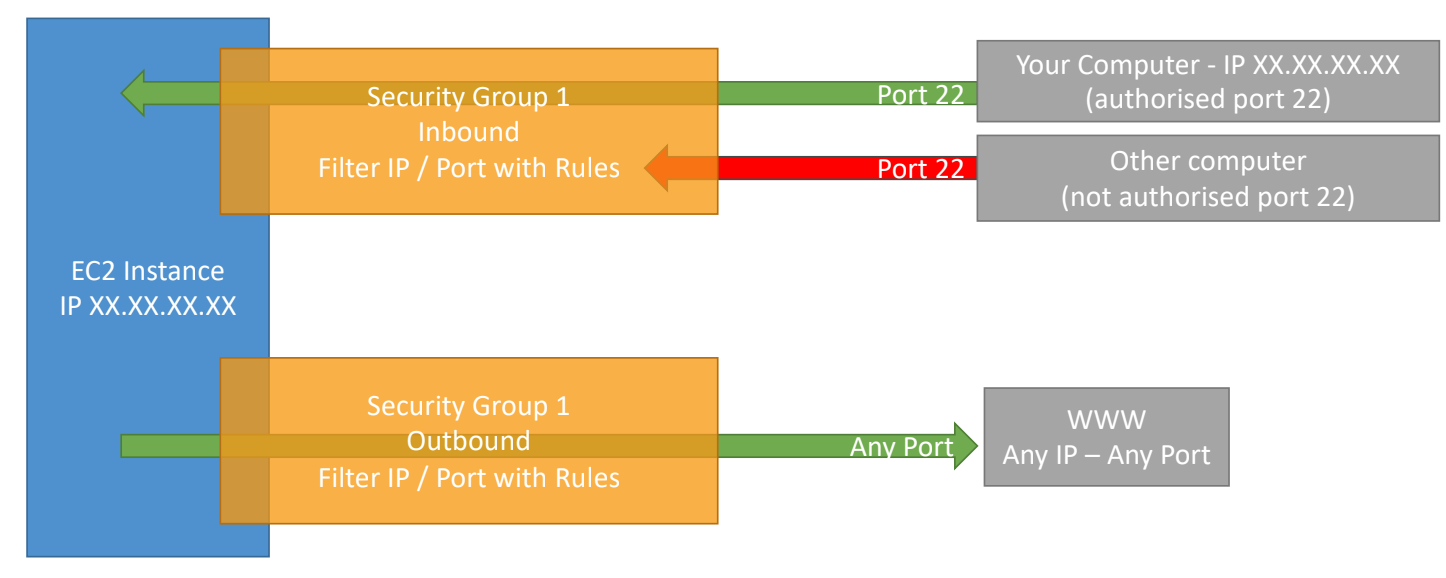
- **Security Groups** are **virtual firewalls** that control inbound and outbound traffic to Amazon EC2 instances.
- They act at the instance level, not the subnet level, and provide a way to manage access to resources within a VPC (Virtual Private Cloud).
- Security groups can be associated with multiple instances and can be modified at any time, allowing for flexible management of network access.
- **Key Features**:
- By default, all inbound traffic is denied, and all outbound traffic is allowed.
- You can specify rules based on protocol (TCP, UDP, ICMP), port number, and source IP address or CIDR block.
### Common Use Cases
- Restricting access to an application server (allowing only specific IPs).
- Allowing traffic from specific ports (e.g., HTTP/HTTPS).
- Isolating database instances from public access.
## Deeper Dive
- **Inbound Rules**: Define the traffic allowed into your instances.
- **Outbound Rules**: Define the traffic allowed out from your instances.
- Each rule includes:
- **Type**: The protocol used (e.g., HTTP, SSH).
- **Protocol**: The protocol number (TCP = 6, UDP = 17).
- **Port Range**: The port(s) affected by the rule.
- **Source/Destination**: The IP address or CIDR range from which traffic is allowed.
### Security Groups Diagram
### Examples of Security Group Rules
| **Rule Type** | **Protocol** | **Port Range** | **Source/Destination** |
| ------------- | ------------ | -------------- | --------------------------- |
| Inbound Rule | TCP | 22 | 203.0.113.0/24 (SSH Access) |
| Inbound Rule | TCP | 80 | 0.0.0.0/0 (HTTP Access) |
| Outbound Rule | All Traffic | All | 0.0.0.0/0 |
### Good to Know
- **Limits**: Each security group can have up to 60 inbound and 60 outbound rules by default (this limit can be increased by requesting through AWS Support).
- **Default Security Group**: When you create a VPC, a default security group is automatically created, which allows all outbound traffic and denies all inbound traffic by default.
- **Multiple Security Groups**: You can assign multiple security groups to a single EC2 instance, enabling fine-grained control over traffic.
- **Security Best Practices**:
- Apply the principle of least privilege (only allow necessary traffic).
- Regularly review and audit security group rules.
- Use descriptive names and tags for easy management.
## Classic Ports to Know
| **Port Number** | **Protocol** | **Service** | **Description** |
| --------------- | ------------ | ------------------- | --------------------------------------------------------------------------------------------------- |
| 20 | TCP | FTP (Data Transfer) | Used for transferring files over FTP. |
| 21 | TCP | FTP (Control) | Used for controlling file transfer sessions. |
| 22 | TCP | SSH | Secure Shell for secure logins and command execution. |
| 80 | TCP | HTTP | Hypertext Transfer Protocol for web traffic. |
| 443 | TCP | HTTPS | Secure HTTP for secure web traffic. |
| 3389 | TCP | RDP | Used for Remote Desktop Protocol, allowing users to connect to and control remote Windows machines. |
## EC2 Instance Launch Types
- [**On Demand Instances**](#on-demand-instance): short workload, predictable pricing
- [**Reserved**](#reserved-instances): (1 & 3 years)
- **Reserved Instances**: long workloads
- **Convertible Reserved Instances**: long workloads with flexible instances
- [**Savings Plans**](#savings-plans) (1 & 3 years): commitment to an amount of usage, long workload
- [**Spot Instances**](#spot-instances): short workloads, for cheap, can lose instances
- [**Dedicated Instances**](#dedicated-instances): no other customers will share your hardware
- [**Dedicated Hosts**](#dedicated-hosts): book an entire physical server, control instance placement
- [**Capacity Reservations**](#capacity-reservations): reserve capacity in a specific AZ for any duration
### On Demand Instance
- Pay for what you use:
- Linux or Windows - billing per second, after the first minute
- All other operating systems - billing per hour
- Has the highest cost but no upfront payment
- No long-term commitment
- Recommended for **short-term** and **un-interrupted workloads**, where you can't predict how the application will behave
### Reserved Instances
- Up to 72% discount compared to On-demand
- You reserve a specific instance attributes (Instance Type, Region, Tenancy, OS)
- Reservation Period – 1 year (+discount) or 3 years (+++discount)
- Payment Options – No Upfront (+), Partial Upfront (++), All Upfront (+++)
- Reserved Instance’s Scope – Regional or Zonal (reserve capacity in an AZ)
- Recommended for steady-state usage applications (think database)
- You can buy and sell in the Reserved Instance Marketplace
- Convertible Reserved Instance
- Can change the EC2 instance type, instance family, OS, scope and tenancy
- Up to 66% discount
### Savings Plans
- Get a discount based on long-term usage (up to 72% - same as RIs)
- Commit to a certain type of usage ($10/hour for 1 or 3 years)
- Usage beyond EC2 Savings Plans is billed at the On-Demand price
- Locked to a specific instance family & AWS region (e.g., M5 in us-east-1)
- Flexible across:
- Instance Size (e.g., m5.xlarge, m5.2xlarge)
- OS (e.g., Linux, Windows)
- Tenancy (Host, Dedicated, Default)
### Spot Instances
- Can get a discount of up to 90% compared to On-demand
- Instances that you can “lose” at any point of time if your max price is less than the current spot price
- The MOST cost-efficient instances in AWS
- Useful for workloads that are resilient to failure
- Batch jobs
- Data analysis
- Image processing
- Any distributed workloads
- Workloads with a flexible start and end time
- Not suitable for critical jobs or databases
### Dedicated Hosts
- A physical server with EC2 instance capacity fully dedicated to your use
- Allows you to address compliance requirements and use your existing server- bound software licenses (per-socket, per-core, pe—VM software licenses)
- Purchasing Options:
- On-demand – pay per second for active Dedicated Host
- Reserved - 1 or 3 years (No Upfront, Partial Upfront, All Upfront)
- The most expensive option
- Useful for software that have complicated licensing model (BYOL – Bring Your Own License)
- Or for companies that have strong regulatory or compliance needs
### Dedicated Instances
- Instances run on hardware that’s dedicated to you
- May share hardware with other instances in same account
- No control over instance placement (can move hardware after Stop / Start)
### Capacity Reservations
- Reserve On-Demand instances capacity in a specific AZ for any duration
- You always have access to EC2 capacity when you need it
- No time commitment (create/cancel anytime), no billing discounts
- Combine with Regional Reserved Instances and Savings Plans to benefit from billing discounts
- You’re charged at On-Demand rate whether you run instances or not
- Suitable for short-term, uninterrupted workloads that needs to be in a specific AZ
### EC2 Instance Launch Types Comparison
| **Launch Type** | **Cost Structure** | **Payment Options** | **Commitment** | **Use Case** | **Flexibility** |
| ------------------------- | ----------------------------------------------------------------------------------- | ------------------------------------------------------ | ----------------------------- | ------------------------------------------------------------ | ------------------------------------------------------------------------ |
| **On-Demand Instances** | - Linux/Windows: per second after the first minute
- Other OS: billed per hour | No upfront payment | No long-term commitment | Short-term and unpredictable workloads | High flexibility; can start/stop anytime |
| **Reserved Instances** | Up to 72% discount compared to On-Demand | - No Upfront
- Partial Upfront
- All Upfront | 1 year or 3 years | Steady-state applications (e.g., databases) | Reserved capacity in a specific region or AZ |
| **Savings Plans** | Up to 72% discount based on long-term usage | Commit to a certain usage amount | 1 year or 3 years | Applications with predictable usage patterns | Flexible across instance size, OS, and tenancy |
| **Spot Instances** | Discount up to 90% compared to On-Demand | Pay the Spot price | No commitment required | Cost-sensitive, resilient workloads (e.g., batch jobs) | Instances can be terminated anytime if spot price exceeds your max price |
| **Dedicated Hosts** | Most expensive; pay per second for active host | - On-Demand
- Reserved (1 or 3 years) | Long-term commitment possible | Compliance-heavy applications or complex licensing models | Full control over server; ideal for BYOL scenarios |
| **Dedicated Instances** | Higher than shared instances; not the most expensive | On-Demand pricing | No long-term commitment | Workloads needing dedicated hardware but can share resources | Limited control over instance placement |
| **Capacity Reservations** | Billed at On-Demand rates regardless of instance running | No upfront payment | No time commitment | Ensures EC2 capacity availability in a specific AZ | Can create/cancel anytime; no discounts on billing |
## Which purchasing option is right for my use case?
- **On-Demand Instances**:
- Staying at a resort whenever we want and paying the full price for each night.
- Ideal for a startup running a web application with unpredictable traffic spikes.
- **Reserved Instances**:
- Planning a long vacation in advance, allowing us to get a significant discount for booking ahead.
- Best for a company operating a database server that requires constant uptime for a year.
- **Savings Plans**:
- Committing to a set amount per hour for a specified duration while enjoying any room type
- Suitable for a SaaS provider that anticipates steady usage of compute resources over three years.
- **Spot Instances**:
- Bidding for available rooms; the highest bidder secures the room, but they can be asked to leave at any moment.
- Perfect for a research team processing large data sets where jobs can be paused and resumed.
- **Dedicated Hosts**:
- Renting an entire wing of the resort exclusively for ourselves.
- Appropriate for a financial institution needing to comply with strict regulatory requirements and using custom software licenses.
- **Dedicated Instances**:
- Having a private room that's solely ours but sharing some amenities with other guests.
- Great for a business running non-critical applications that need some level of hardware isolation.
- **Capacity Reservations**:
- Booking a room for a set period at full price, even if we don’t end up using it.
- Useful for an enterprise ensuring EC2 capacity for a new product launch in a specific availability zone.
## Price Comparison Example – m4.large – us-east-1
| **Launch Type** | **Hourly Price** | **Monthly Price (Approx.)** | **Notes** |
| ------------------------- | ------------------------------------ | --------------------------- | ---------------------------------------------------------------- |
| **On-Demand Instance** | $0.096 per hour | $69.12 | Pay-as-you-go pricing. Ideal for short-term usage. |
| **Reserved Instances** | $0.054 per hour (1-year term) | $39.24 | Commit to one year for a significant discount. |
| **Savings Plans** | $0.058 per hour (1-year term) | $41.76 | Flexible savings plan applicable to any instance type. |
| **Spot Instances** | $0.028 per hour (varies with demand) | $20.16 | Pricing varies; can be interrupted. Best for flexible workloads. |
| **Dedicated Hosts** | $0.12 per hour (per host) | $86.40 | Dedicated physical server; pricing per host. |
| **Dedicated Instances** | $0.096 per hour | $69.12 | Similar to on-demand but on dedicated hardware. |
| **Capacity Reservations** | $0.096 per hour | $69.12 | Reserved capacity at on-demand pricing. |
## Shared Responsibility Model for EC2
| **Responsibility** | **AWS Responsibilities** | **User Responsibilities** |
| --------------------------- | -------------------------------------------------------------------------------------------------------- | ------------------------------------------------------------------------- |
| **Infrastructure Security** | The security of the underlying infrastructure, including hardware, software, networking, and facilities. | Securing the EC2 instances, including operating systems and applications. |
| **Physical Security** | Ensures physical security of data centers where EC2 instances run. | N/A |
| **Network Security** | Implements security measures for the network, including firewalls and DDoS protection. | Configuring security groups, network ACLs, and VPC settings. |
| **Data Protection** | Provides encryption options for data at rest and in transit. | Managing data encryption and access control. |
| **Access Management** | Offers IAM services to manage access to AWS resources. | Configuring IAM users, roles, and policies for access management. |
| **Compliance** | Complies with various compliance standards and certifications for infrastructure. | Compliance related to the applications and data hosted on EC2 instances. |
| **Patch Management** | Provides a secure and up-to-date infrastructure. | Applying patches and updates to the operating system and applications. |
## EC2 Section – Summary
- EC2 Instance: AMI (OS) + Instance Size (CPU + RAM) + Storage + security groups + EC2 User Data
- Security Groups: Firewall attached to the EC2 instance
- EC2 User Data: Script launched at the first start of an instance
- SSH: start a terminal into our EC2 Instances (port 22)
- EC2 Instance Role: link to IAM roles
- Purchasing Options: On-Demand, Spot, Reserved (Standard + Convertible + Scheduled), Dedicated Host, Dedicated Instance